Productizer — requirements that stay true
Claude Code is already very good at the work. What it does not do on its own is remember what you agreed. After enough sessions nobody can answer “what did we decide this system does?” — the code is fine, the decisions are scattered across chat logs. This is a plugin, not a platform: two commands to install, one markdown file per product, and an agent that sits beside you keeping that file true as the work goes.
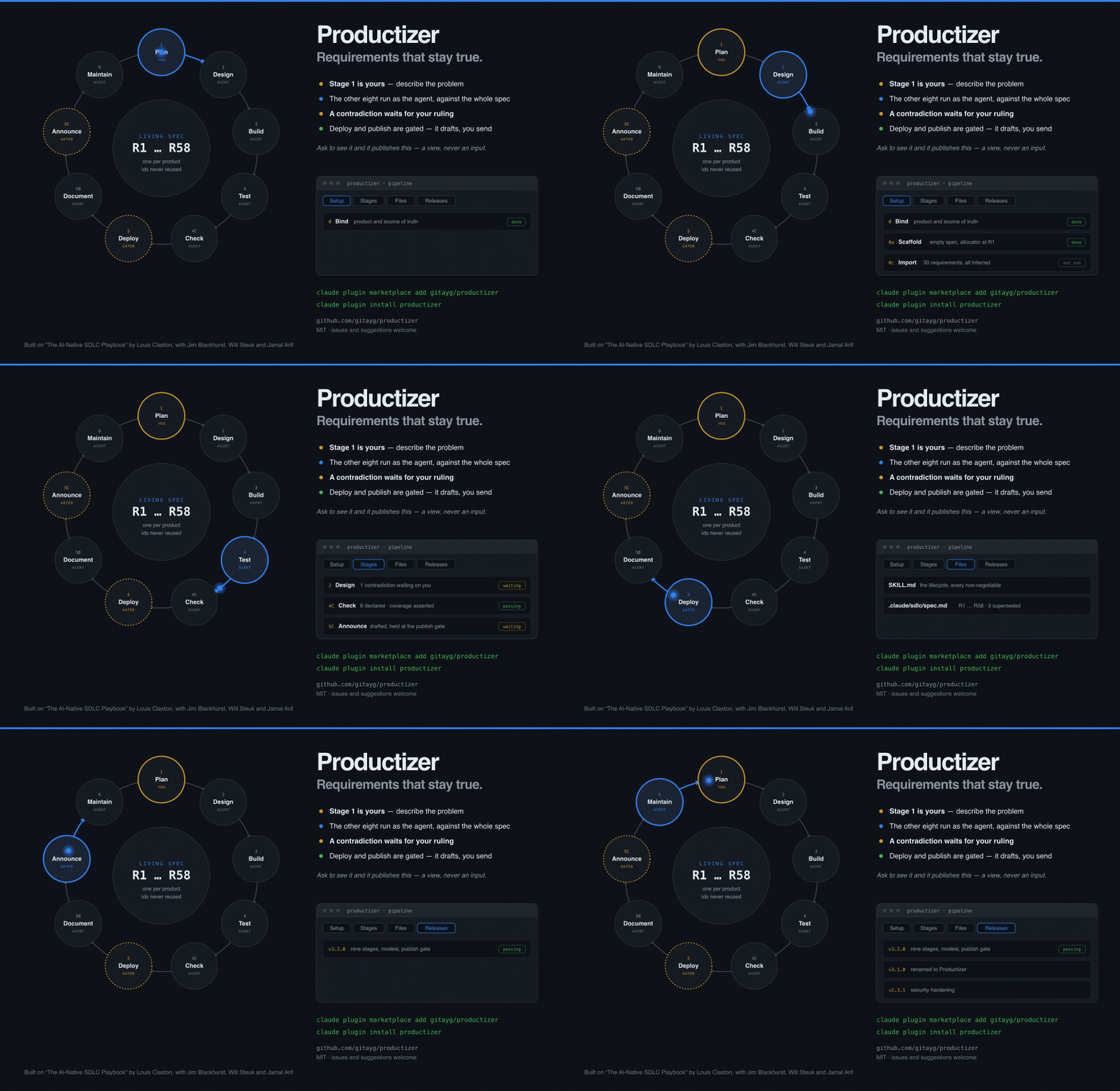
The dashboard, cycling through its tabs. Generated from the repository’s own files — if the spec is wrong, the page shows it.
Manageable on purpose. One file, in your repo.
Stage 1 is yours: describe the problem, as a GitHub issue or just in chat. Stages 2 to 6 — design, build, test, deploy, maintain — run as the agent, against the whole spec rather than a blank page. You stay in three places that actually need judgement: ruling contradictions, approving the pull request, and triaging what production sends back.
That is the difference between a line and a loop. Work moves at agent speed; the decisions stay yours.
Reference: Louis Claxton, The AI-Native SDLC Playbook, claude.com — with contributions from Jim Blackhurst, Will Steuk and Jamal Arif.
MIT licensed. github.com/gitayg/productizer — issues and suggestions welcome, and they get classified the same way everything else does.
Writing the spec is the collaboration
You do not write a specification and hand it over. You describe what you want, and the agent works it into the spec that already exists — naming what is genuinely new, tightening what was vague, and telling you when something is already covered. The spec gets better every time you use it, because keeping it true is the work rather than a chore beside it.
Four things can come back, and only two of them make work:
Extend
Nothing covers it yet. New requirements get the next ids and are written in EARS, so each one names a trigger and an observable response a test can assert.
Refine
Covered, but imprecise. Same requirement id, tightened text, recorded with the issue that drove it.
Duplicate
Already specified. You get the requirement id and it stops. That is not a rejection — if the behaviour exists but does not work, that is a bug, which is a more useful thing to know.
Contradict
What you have asked for conflicts with something already agreed. You get both, side by side, and you decide. Nothing is merged until you do — not because the tool is strict, but because that decision is genuinely yours and the agent has no way to make it well. This is the part the other tools leave out: Spec Kit recommends resolving, BMAD applies the change and mentions the conflict.
R14 still means R14 two years on. Reuse an id and every citation silently redirects to a different requirement while the suite stays green. Replaced requirements are marked superseded and keep their original text. BMAD gets this right too, in almost the same words; most tools renumber per feature, which quietly breaks every citation you ever wrote.
Install it in two commands
# add the marketplace, then install the plugin
claude plugin marketplace add gitayg/productizer
claude plugin install productizer
Then just describe what you want. The skill works out which stage you are in from the issue and the branch, asks once for the repo binding, and writes it to .claude/productizer/config.json so it never asks again.
What comes with it
- A living spec per product, committed to your repo at
.claude/productizer/spec.md. It is version-controlled like everything else —git log -pon that file is the audit trail. It sits under.claude/only so build tools, site generators, doc builds and packaging skip it: the spec is never rendered as a page or shipped inside a release. Scaffolding checksgit check-ignorefirst, because a spec that cannot be committed is not an audit trail. - Control bands that watch a real metric and open an issue when it breaches — deterministic detection, no model deciding whether something broke. This one is Anthropic’s design, taken from the playbook rather than invented here.
- An eval suite that regression-tests your agent configuration, not just your product.
- A production gate that fails closed, and review that runs in a clean context — the session that wrote the code never reviews it.
- Dashboards on request. Ask to see the pipeline and it publishes one: every stage, every file, every next command.
the part that is hard to describe, and obvious once you see it
Ask to see it, and it publishes a dashboard
This is the part that is hard to describe and obvious the moment you see it. The lifecycle lives in markdown files, because files are the only thing that reviews, diffs and survives. But nobody reads a lifecycle as markdown. So when you ask to see it, the agent generates a read-only page from those same files and hands you the link.
Not a service, not a login, and nothing to keep running. It is a single HTML file generated from the current state of your repo — a view, never an input. Nothing is ever read back out of it into the spec, because the moment a view becomes editable the committed chain stops being the audit trail.
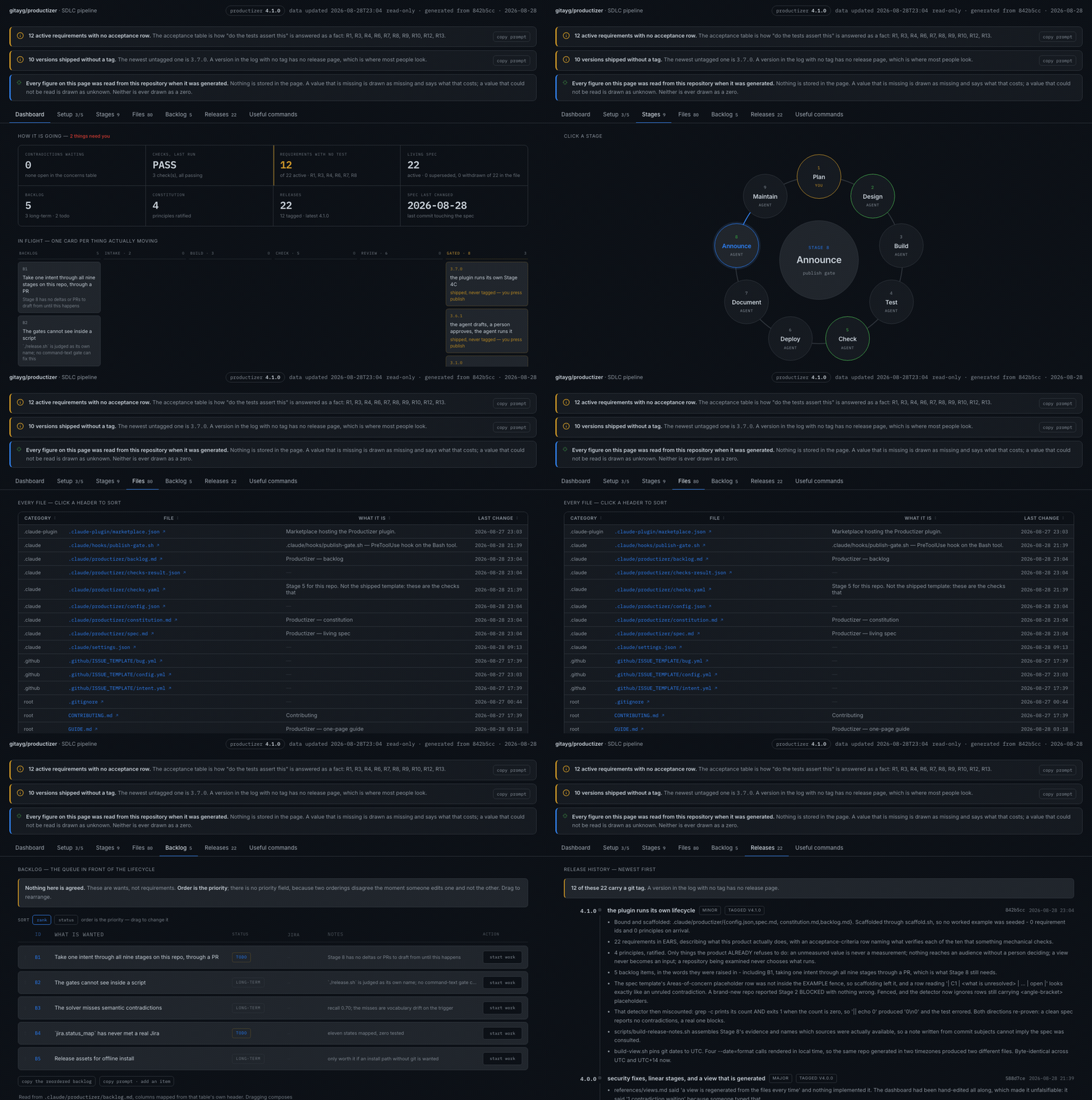
A static sample — click the tabs. The published view carries live counts from your own repo, and its backlog can be dragged into priority order.
- Every stage is clickable — open the file that stage writes, or copy the exact prompt that runs it.
- Warnings sit at the top as banners. An unscaffolded repo, an uncommitted spec, a contradiction nobody has ruled on — the things that make the audit trail a fiction if left alone.
- Every file in the skill is listed with what it is and when it last changed, sortable, each one a link.
- Release history from the actual git log, with what shipped in each version and which ones were tagged.
- Four other views on the same principle: the living spec, the intake queue, a control band, and the fleet across every bound repo.