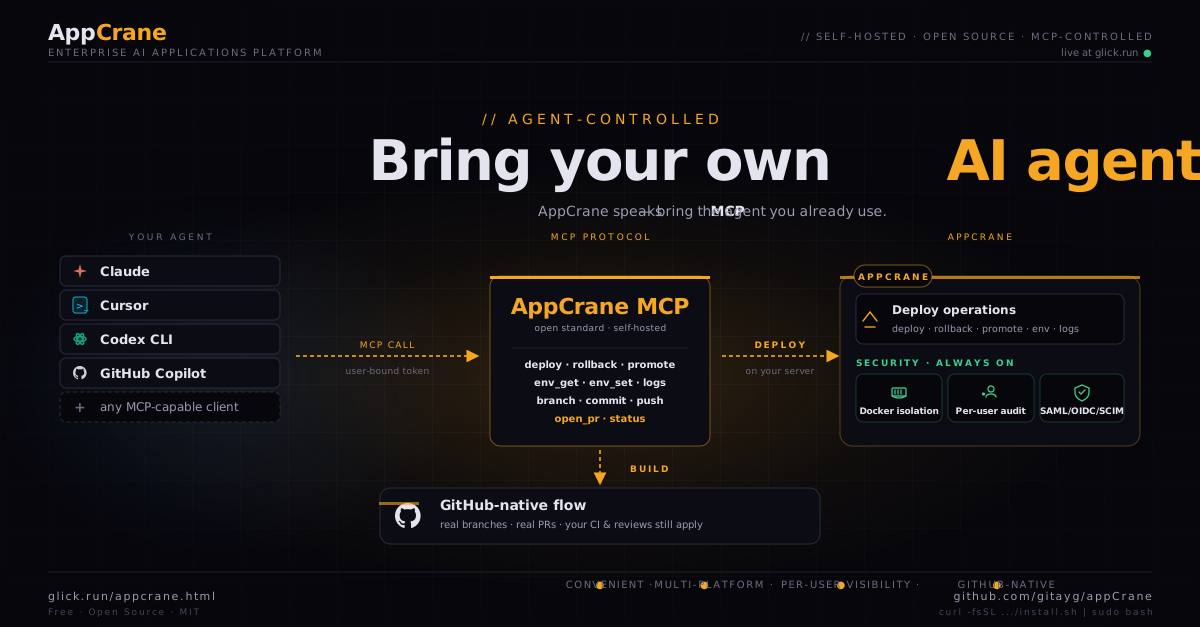
Model Context Protocol — the open standard from Anthropic — is the most important thing the AI ecosystem shipped this year. It lets any AI agent talk to any tool in a standard way. Your agent doesn't need a custom integration with every service. Services don't need to ship a UI. Both sides speak MCP and they meet in the middle.
What that means in practice: the agent you already pay for — Claude Code, Cursor, Codex CLI, Claude Desktop — can drive your infrastructure directly, from your local environment, with your local context. No proprietary coding sandbox to learn. No second editor to live in. No bespoke per-tool integration to maintain.
AppCrane shipped its MCP server in v1.7. This post walks through what's in it, why we made the calls we made, and what it means for self-hosted deployment platforms going forward.
What we shipped
An MCP server, mounted on your AppCrane instance, that exposes the platform's core operations as tools. The full surface in v1.7:
deploy(app, env),rollback(app, env),promote(app)env_get(app, env, key),env_set(app, env, kv),env_delete(app, env, key)logs(app, env, tail?),status(app),app_list()branch(app, name),commit(app, message),push(app),open_pr(app, title, body)
You add the AppCrane endpoint and a user token to any MCP-capable client. From that point on, the agent calls AppCrane directly. A real call looks like this:
{
  "method": "tools/call",
  "params": {
    "name": "deploy",
    "arguments": {
      "app": "bookclub",
      "env": "sandbox"
    }
  }
}
AppCrane responds with a deploy ID, the resolved commit SHA, and a stream URL for live logs. Standard MCP, nothing custom.
What we deleted
An earlier plan included an in-portal coding session: a per-session Docker container with a baked-in agent runtime, cloned repo, browser-streamed stdout, "Ship to Sandbox" button. We designed the spec. We started building it. Then we deleted it.
Three reasons:
- The agent you already use is better than the one we'd ship. Claude Code, Cursor, and friends have full editor integration, your local context, your shell history, your dotfiles. We were never going to match that inside a hosted container.
- Less to build is less to maintain. The in-portal session needed: container lifecycle management, idle eviction, orphan recovery, log buffering, SSE streaming, branch state machine, "is this Claude or that Claude?" routing. All of that disappears when the agent runs locally.
- One less proprietary tool in your stack. Open standards win the long game. MCP is being adopted across the ecosystem. Building on top of it means our work compounds with everyone else's, not in spite of it.
Per-user identity, end to end
This is the part that turns out to matter most for production teams. Each MCP token is bound 1:1 to an AppCrane user. When an agent calls a tool, AppCrane records:
- The user (from the token)
- The agent's MCP client identifier (e.g.
claude-code/0.4.2) - The app, env, action, arguments
- The result — success/error, deploy ID, commit SHA
The dashboard surfaces per-user activity in real time. The audit log lets you query "what did Sarah do this week?" or "every deploy from a Cursor session in the last 24 hours". You always know which person was behind a change — even when the AI did the typing.
Most agent-tool integrations either share a single service token across the whole team (no individual attribution) or rely on the agent to truthfully forward identity (trivially spoofable). Token-bound 1:1 user identity is what makes AI-driven deploys auditable enough for a regulated team.
GitHub-native flow
Agent edits go through real git, not a side channel. The MCP branch tool creates a feature branch as agent/{slug}-{name}. commit and push use the user's git credentials. open_pr opens a PR with a generated summary and links it back to the agent session that produced it.
Push to main still triggers the existing HMAC-verified webhook auto-deploy. CI checks, branch protection rules, required reviews — all of it continues to apply. AppCrane never bypasses GitHub. If your team has rules about how code reaches production, those rules apply equally to humans and agents.
What this means for self-hosted infrastructure
If you build infrastructure: ship an MCP server. Stop building proprietary in-product UIs that try to wrap an LLM. The model is changing too fast and the integration layer is settling. Let your users bring their own agent. Focus your team on what your platform actually does.
If you use AI agents: look for the MCP-native tools first. The friction of adopting a new platform drops to near zero when your existing agent already speaks its language. We're at the start of an interop wave that's going to compound for years.
And if you're running AppCrane: upgrade to v1.7, generate an MCP token from the dashboard, and point your agent at it. Your deploy call will go through with full per-user audit on the first try.
AppCrane is a self-hosted enterprise AI applications platform. MIT licensed. Free. Runs on any Ubuntu 22.04+ server.